P Print Inspector
Improved Timeline Experience in EasyMode
2025-11-12
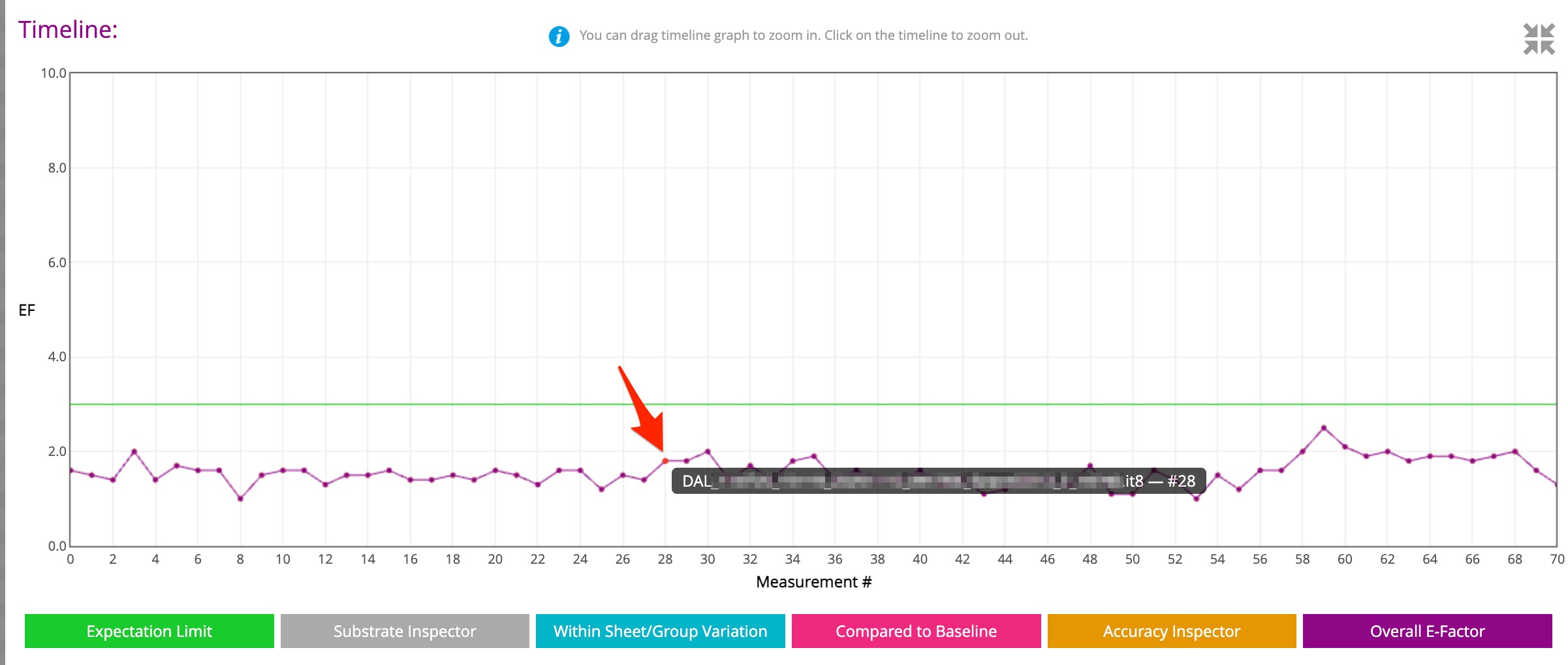
We have enhanced the Timeline view in EasyMode to help you better understand and interact with your color data.
Now when you hover over a dot, you will instantly see the File Name and Index, giving you immediate context.
Click on any data point to open the full measurement in a new tab in Expert Mode, without losing your place.
This improvement bridges the gap between the Timeline and the File List, making it faster and more efficient to find and review the exact measurement you need.
GG7 Curve Inspector
New Curve Export: Equios & ISO 18620
New Calibration Curve Export Formats: Screen Equios and ISO 18620 (TED)
LEARN MORE ›››PPrint Inspector
Improved Timeline Experience in EasyMode
We have enhanced the Timeline view in EasyMode to help you better understand and interact with your color data.
LEARN MORE ›››PPrint Inspector
New Grouping Feature in PC Qualifier
New Grouping Feature in PC Qualifier
LEARN MORE ›››HColor Inspector
Exclude Out-of-Gamut Colors
Virtual Spot Print / Exclude out-of-gamut colors
LEARN MORE ›››EEnvironmental Inspector
Customizable data logger colors
The color of data loggers can be customized on the Dashboard
LEARN MORE ›››