Suppliers Inspector
Please note - this tool is under development and is subject to change. This is a draft to get feedback from our users.
"Suppliers Inspector" is a tool designed to organize and track communication in the supply chain. This Inspector allows for more comprehensive communication and data-sharing between the brand and their color supply chain.
This tool facilitates the Print Broker/ Brand Owner:
• Inviting new suppliers to submit color performance data to prove they are meeting the brands expectations,
• Communicate the Brand's requirements to the supply chain,
• Receiving data back from the suppliers showing that they conform to the Brands expectations.
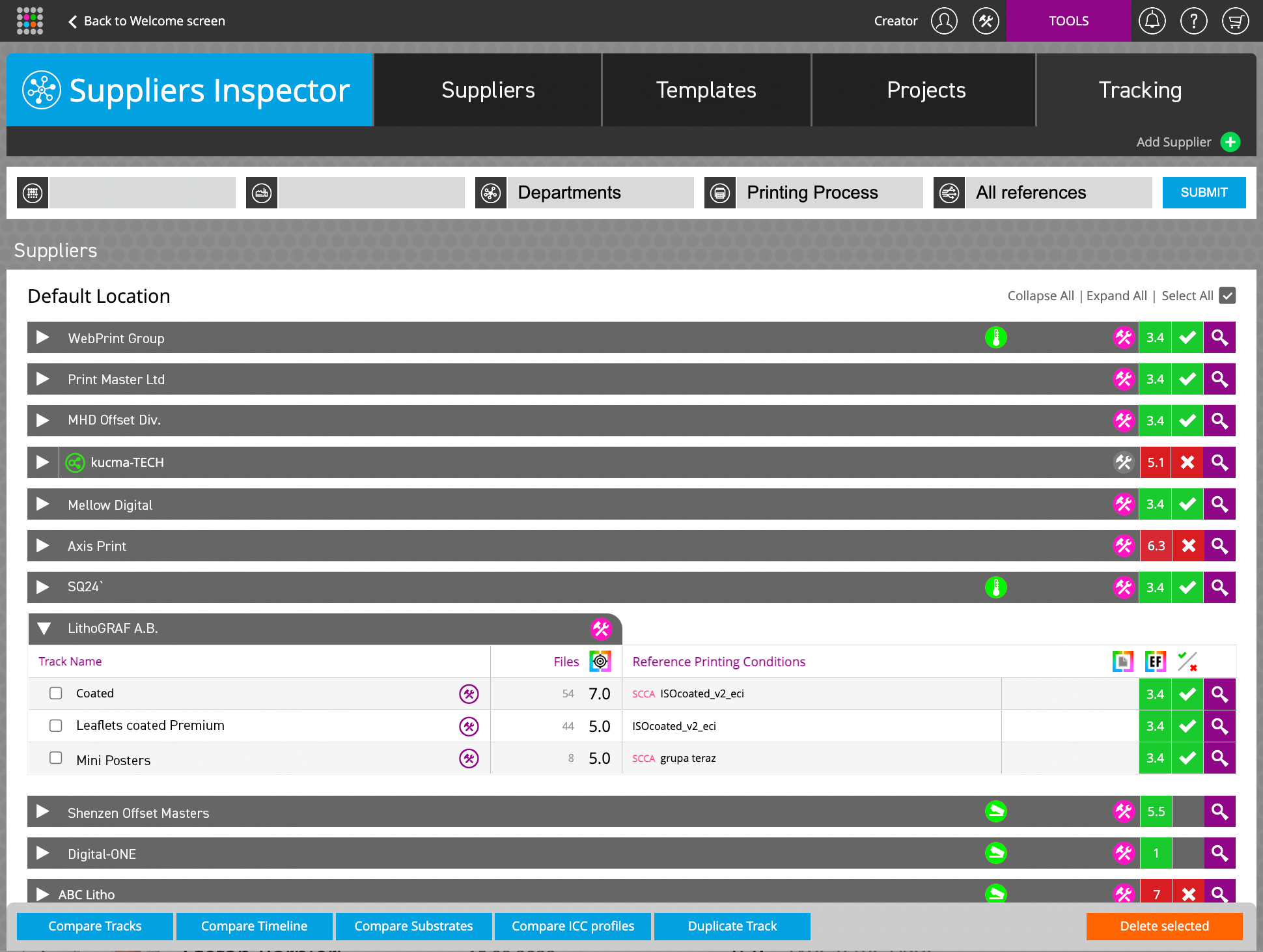
The Tracking tab provides a 50,000 foot view of the suppliers performance. This view is similar to the traditional Print Inspector dashboard which provides timelines and detailed reports. The main differences are that each track collects data from one or more presses and that the Track settings are locked (not editable) for Suppliers.
How does it work?
First, the Brand defines their color requirements in a Template. Then they distribute this template (which is essentially a PRX (Print Requirements eXchange) to their suppliers. Next, the Supplier uses PQX (Print Quality eXchange) compatible software or ChromaChecker to send data back to the ChromaChecker server.
A separate account for each supplier has to be created. Depending on the suppliers measurement software solution, data can be captured manually or automatically. Proper implementation is a key to success. The on-boarding system will help direct the supplier to submit their measurement data in the easiest way up to the brand.
New Supplier invitation process.
There are two scenarios - either the supplier already owns ChromaChecker or they don't. If they don't own ChromaChecker, the invitation process creates a new ChromaChecker account for the supplier.
To learn more about invitation procedures select one of the following:
Templates Tab
Parent account subscriber has to define technical requirements for suppliers by creating Templates, which are specifying print condition for different kind of jobs. Templates are corresponding to Track Preferences in Print Inspector.
The key elements of the Template are:
- Source of References (selected ICC Profile or OK-Sheet)
- Tolerance Set
- Color Library and/or Color Palette (spot colors definition)
- Substrate (optional)
- Control-Stip (optional)
- other track preferences
There is a potentially an unlimited number of Templates, however, it is practical to limit the number of them as each new one requires to define
Projects Tab
Some suppliers can be invited to join selected projects only.
The Project can define the following parameters:
- A short list of spot colors used for selected Project
- Substrate
- Tolerance set
- Optionally Control strip
- Placeholder definition
- Source of the reference: ICC Profile or OK Sheet
- Additional information defined be PQX
- Contact information (Product Manager)
Projects are designed for both Process Control and final product Quality Control - therefore supporting both scanning and spot measurements. The same Project tab is accessible from Color Inspector.
Supplier Tab
This is a place where the Brand Owner or Print Broker can see a list of all suppliers that shows administration information, and the current status of system implementation but also assign Templates and Projects individually to each Supplier. Also reporting for Performance Inspector can be defined there.
Tracking Tab
This is the main tab for regular production. This is a production dashboard that summarizes current production parameters.
Suppliers Inspector License
This tool is not standard included with a regular version of ChromaChecker. To get access a dedicated subscription is required.
Related Topics
Contact ChromaChecker Support
Additional information and Support Form is available for logged users.
