i1iO / T42
Before you start - important information to extend the T42 lifetime!
- Check if the sliding glide is in good condition to prevent T42 from scratches. If used replace it with a new one. X-Rite is selling glitter rings and the user should take care and replace them when required.
- Adjust instrument height. The target has a thickness of 0.4 mm and for normal operation, the manufacturer does not require lifting the instrument. This thickness is considered thin enough that it does not need to be adjusted. However, the instrument is sliding with a pressure of more than 100g, which means that the friction will be significant. As a result, it will cause scratches in the transparent protective film, and this, due to the change in gloss, will cause the readings to change over time. Therefore, to prevent scratching, we recommend that you lift the robot arm a bit upwards so that it does not detach from the measured surface anywhere, but it will reduce the friction force and extend the life of the target. It should be remembered that the X-Rite designed both the i1Pro and the i1iO as contact instruments - by design scratching the surface to be measured. To learn more on scratching T42 by i1iO contact measurements read this article
- Check if your calibration plaque is clean.
Pre-positioned T42 scanning template for X-Rite i1iO
The operator has to place the target on a white measurement area using the lower-left corner for alignment (green arrows).
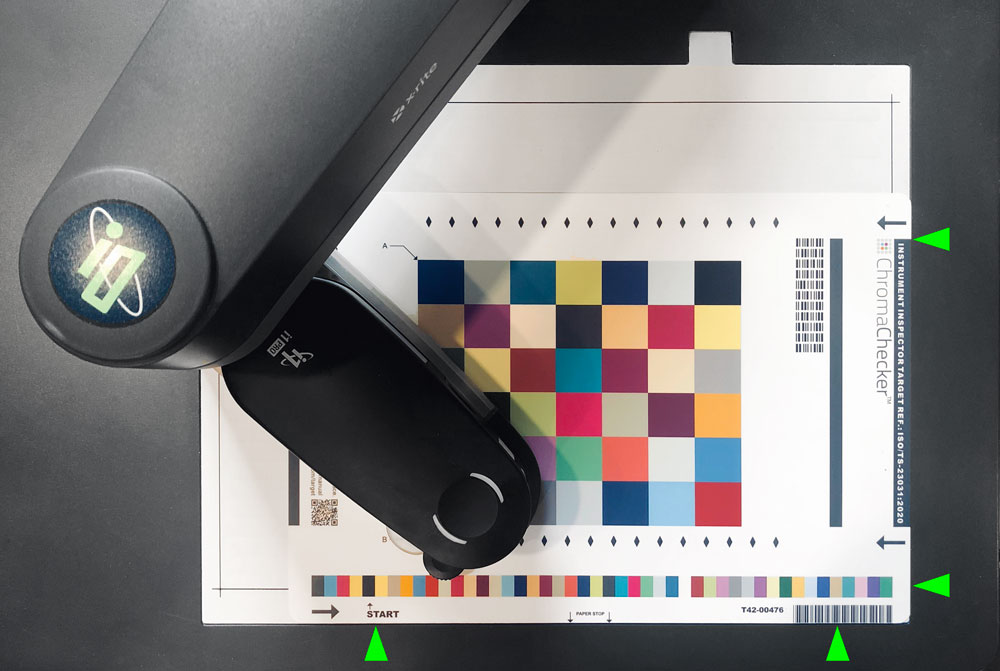
For the first time, the operator can verify if coordinates are properly recognized.
To perform this click on the "Verify" button. Instruments crosshair should show corners of the main patch area.
The first attempt - creating a baseline.
CC Capture will check for default baseline - if not detected a new will be created automatically. Just hit the "Measure" button and the whole process will perform.
Routine checking - verification
To be sure that your instrument is in good predictable condition perform frequent verification. This process takes a little more than 2 minutes (from hitting the "Measure" button).
Recommendations
We recommend for i1iO users have two T42 Targets. One for frequent use (that may also frequently require baseline updated due to potential scratches) and one for self-certification purposes that may be used for long-term verification (e.g. one per year) - so ISO9000 requirements will be met based on the same baseline.
Related Topics
Contact ChromaChecker Support
Additional information and Support Form is available for logged users.
