April 22, 2022
Printing Devices Details (Edit Device)
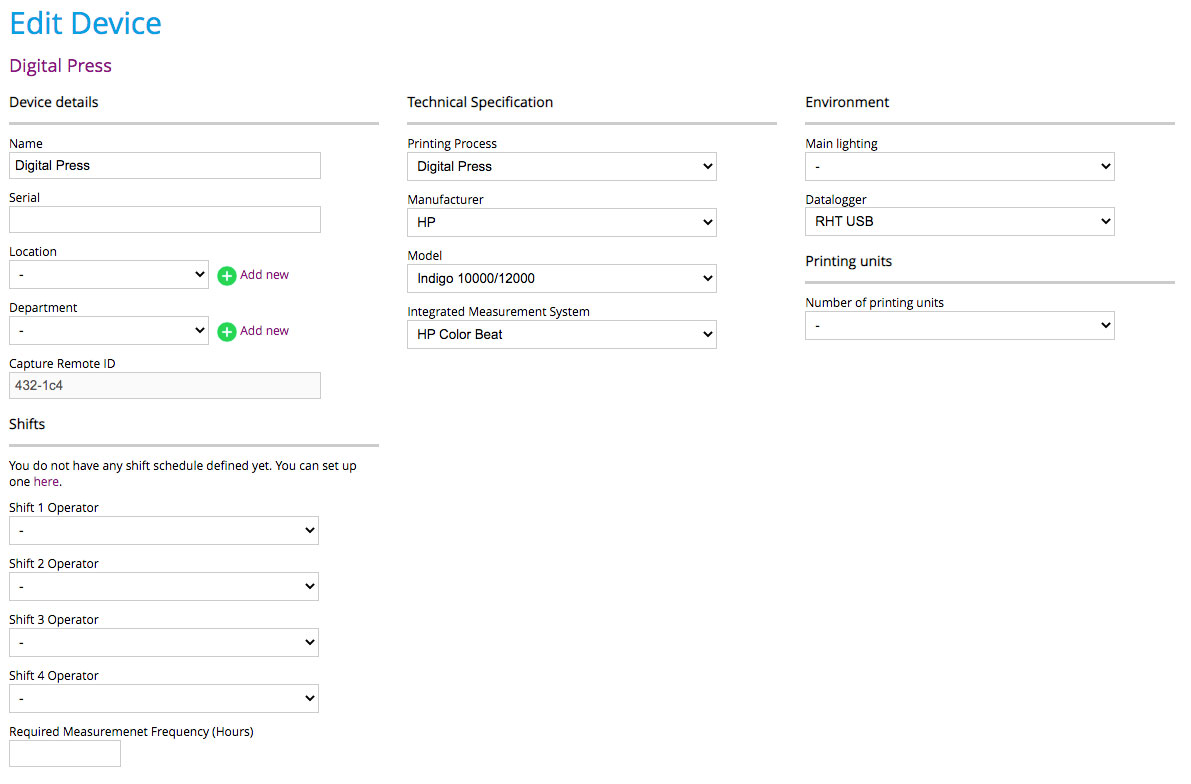
You can edit your device details by going to Devices along the menu bar at the top of Print Inspector or depending on your default view simply click on the preferences icon or printer name displayed. Any way you chose is acceptable.
The fields to be completed are organized into the following sections:
Device (Printer) Details
- The Serial Number field is used for reconciling results back to a specific device for reports. It is an important field when used for system reporting and coordination with other reporting systems.
- Location is used to identify specific production facilities and can be assigned to users or management for reporting purposes. Location can be used with the main dashboard to display pass/fail results on a main dashboard.
- Department is used to identify specific production facilities and can be assigned to users or management for reporting purposes. Location can be used with the main dashboard to display pass/fail results on the main dashboard.
- Capture Remote ID is used as a security feature when accessing a remote instrument using the Capture software. Capture software can be installed on any workstation and used to review results and generate curves even if the workstation is not attached to an instrument. This is valuable for management, color specialists, and operators.
Technical Specifications
- The Printing Process defines the type of printing being performed
- A manufacturer is defined by the printing device being assigned
- Model is the specific model of the printer in use
- Integrated Measurement System is used if the printing device has a built-in spectrophotometer that can provide spectral data reading for use with ChromaChecker Uploader or using ChromaChecker API for direct input.
- Supplemental Measurement System - Any other instrument other than built into the printing device such as an i1Pro, eXact, iSis, FD9, or any other support instrument. Note: ChromaChecker is an open data exchange system for spectral data that will work with any industry-standard file format such as CGATS.
Environment
- Lighting for identifying if the lighting condition is within tolerance and checked on a regular basis
- Data Logger for humidity and temperature reporting
Shifts
- Shift Operators are assigned by organizations with defined strict shift assignments.
Contact ChromaChecker Support
Additional information and Support Form is available for logged users.
