PDF Color Spaces
Understanding PDF Output Color Space
The user may select color space that is used to address Color Values of the color Patch
- Lab
- RGB
- CMYK
- nCLR (soon)
To make a proper decision it is important to understand the printing system and data workflow. Some typical situations are described below:
RGB Printer
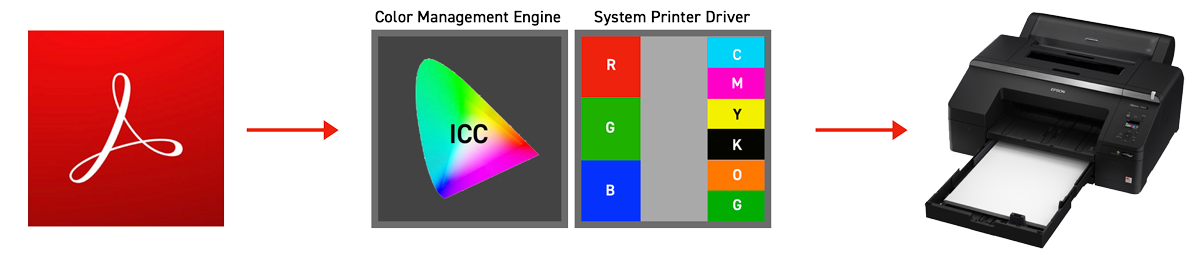
There is a lot of printers including wide-gamut inkjet printers that have a system driver capable to convert RGB color space into an internal color system. For example, Epson Color Stylus P5000 has 11 inks that extend the printer gamut to one of the largest on the market.
Such printers, when profiled as RGB Printer, can be used for hi-demanding tasks. The key is to create an accurate profile that addresses the whole output gamut using RGB coordinates. This is DEVICE ICC Profile - the definition of the gamut of the printer when selected printing setting (resolution and other technical parameters of printing) on the specified substrate. The device ICC Profile is the best solution for accurate printing on such printers. Some vendors deliver common ICC Profiles (averaged...) but only custom-created profiles may work accurately. Substrates can be different from one production batch to another, printers are not identical, environmental parameters (RHT) can be different - that is why the common profile is inaccurate.
Using an RGB profile is less expensive and widely used by designers and photographers - whenever a manual operation is acceptable (nesting option that saves consumables requires RIPs). Some Large Format Printers are controlled by a system RGB driver especially if the user prints on different substrates and there is no need for features that only RIPs can deliver.
Some professional solutions like Alwan Color Hub offers using RGB Printer as Proofers. In this scenario, RGB Profile has to be assigned to Color Management Engine.
Printer controlled by the RIP
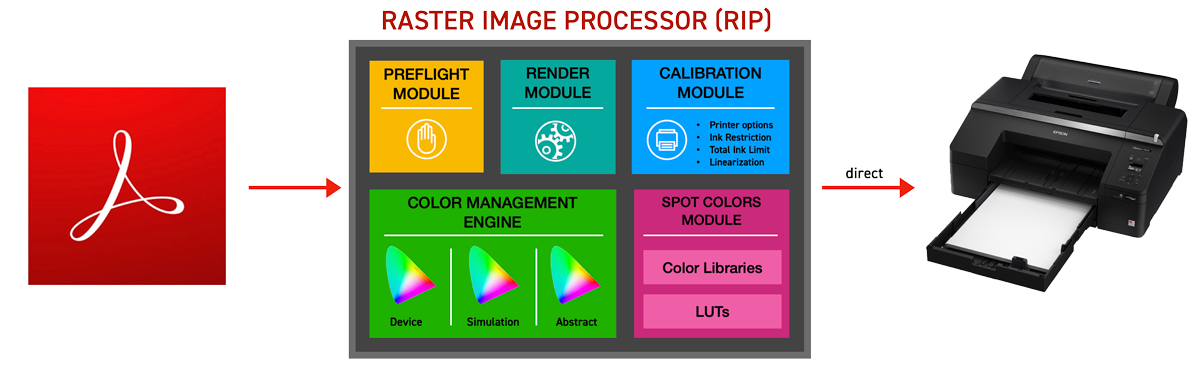
In this case, the printer is connected to the RIP. Communication can be done using direct connection - RIP can control every single nozzle and size of the single drop, speed of carriage, steps, paper suction, and a lot of other parameters.
RIP contains various modules.
- Preflight - in this module the user can specify what kind of input data is accepted. Preflight sometimes is defined in external Workflow Management software ( e.g. Enfocus Switch). Some settings are part of PDF preflight standards (GWG) — selecting some standards may change or overwrite the color space policy.
Also, it is important that some restrictions can be applied by graphic software (e.g Adobe InDesign) or imposition software if PDF is processed by 3rd party software - Render Module that may contain Image Flattener - creates output data for the printer
- Calibration Module - creates media/inks/printer settings that have a huge impact on the device gamut
- Color Management Engine - this is most important to understand what this module is doing with input data. Color space might be converted using preselected rendering intent. It is important to understand that Color Management Engine can use not only DEVICE Profile - which characterized media/ink/printer setting but also SIMULATION Profiles - which can reduce output gamut to simulated color space (e.g GRACoL) And additionally ABSTRACT profiles ( Lab-Lab) used for Optimalisation Purpose!
- Spot Color Modules - that can store Color libraries and can offer LUTs (Look-Up-Tables) that make it possible to render spot color definitions more accurate.
The scenario with RIP might be more complex in the real world. Advanced workflows can use additional components that can have an impact on data processing:
- Color Servers ( e.g. Alwan Color Hub)
- Workflow Managers ( e.g. Enfocus Switch)
- Preflight/Communication software that can not only transmit and analyze but also restrict or process input data.
- Imposition or Nesting tools
- ink-saving tools or tools that reduce the number of impressions
Color Depth
Depending on printing system the user can select 8 or 16-bit color depth. It is important to use 16-bit icc profiles and check if there is no other limitations in the workflow that may limit it to 8-bit only.
RGB color Space for soft-proofing evaluation
If Display is calibrated and profiled the user can use it to check if samples can be displayed (are in display gamut). When CC Display is used the ICC Profile can be exported to ChromaChecker Cloud - and display profiles are listed automatically.
Calibrated and profiled monitor can speed up the process and reduce number of iterations. Also tolerances can be assigned for the soft-proofing purposes. Read more about how to evaluate Color Library for soft-proofing purposes here
Contact ChromaChecker Support
Additional information and Support Form is available for logged users.
