Accuracy to GRACoL (Process)
G7 calibration, E-Factor accuracy, variation and gamut tracking with CC-112.
Overview
Optimal use with scanning instruments, using the ChromaChecker CC-112 four-row control strip (112 patches). Features include checking variations (within page, between page, and between jobs), accuracy to GRACoL with or without SCCA compensation, Ink GPS for ink density/formulation guidance, G7 curve creation and iteration (Idealliance certified), Dot Gain (TVI) curve creation and iteration, and reporting E-Factor, which defines how accurate the printer is. Also enables tracking and comparison of printing devices and print conditions.
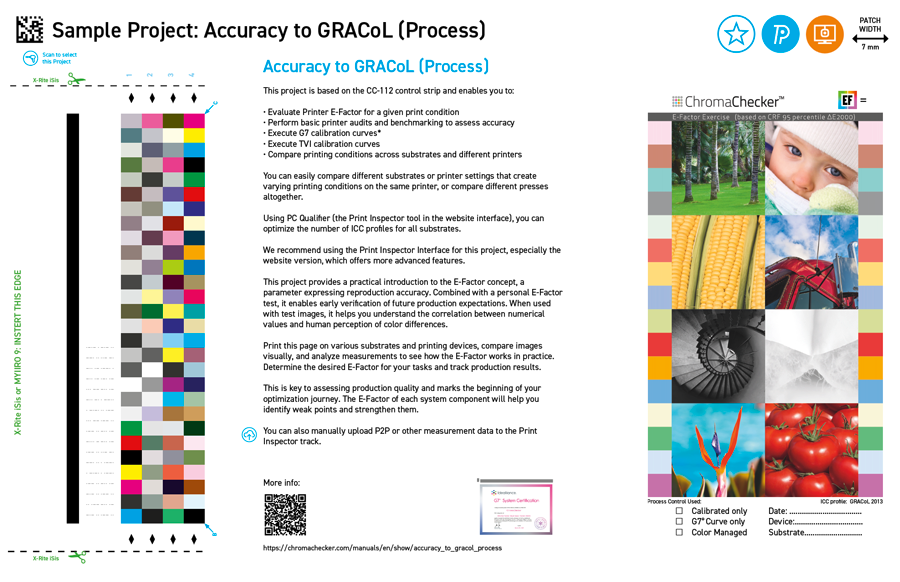
This project is based on the CC-112 control strip and enables:
- Report E-Factor to Reference (defines how accurately the printer aligns with GRACoL or other reference — the lower the number, the more accurate the printer).
- Report E-Factor to other printing devices in the shop.
- Report E-Factor for different paper stocks (understand which paper stocks can share the same G7 Curve and/or ICC Profile).
- Basic Printer Audit / Benchmarking — evaluate consistency and accuracy within sheet, within job, and between jobs.
- Perform G7 calibration curves* — when necessary to make the printer more accurate.
- Perform TVI calibration curves* — when you need more accuracy than what a G7 curve can provide.
- Compare printers printing on different substrates.
Visual Assessment
The test form contains a set of images used in the E-Factor tolerance exercise. You can compare not only the numbers—the E-Factor parameter—but also assess visual convergence by comparing the test images.
If you have a printed E-Factor Exercise/Sampler (included in the Starter Kit), you can see how your impressions correlate with the numbers.
Perform the following tests:
- Print this page on different substrates, on different machines. Compare them.
- Print the same page every day for several days, comparing the images and numbers that reflect the stability/repeatability of the printing device over time.
Introduction to E-Factor
This project offers a practical introduction to E-Factor, a parameter that quantifies production accuracy. Once a company determines its shop’s desired E-Factor for accuracy, it will know which printers are within its company’s capabilities and which ones need improvement to achieve accuracy.
Print this page on various substrates and printing devices, then measure and document the E-Factor on each print. Next, compare the pages visually and measure them to see how E-Factor works in practice. Determine the current E-Factor differences between your printing devices.
Print Quality Conformance Platform. This is the beginning of your Print Quality journey. The E-Factor of each printer component will help you identify weak points in your workflow and make improvements.
Additional features
- CC-112 has multiple primary and secondary patches, which are used to automatically assess variation.
- With PC Qualifier (Print Inspector Tool in the website interface), you can determine the number of ICC profiles required based on your expectations for all substrates.
- CC-112 can be used for hard proof verification according to the ISO-12647-7 specification.
CC-112 key benefits
- E-Factor is calculated using the 112 patches, which provide an excellent description of the quality of color reproduction.
- CC-112 has duplicated patches that automatically calculate within-page variation.
- Despite the limited number of patches, an accurate G7 or TVI calibration can be calculated using this target, often with live production, eliminating the need for dedicated print runs.
- CC-112 is the fastest way to measure a given print’s benchmark (accuracy, variation, gamut size).
Recommended Instruments
- X-Rite: i1 Pro, i1iO, i1iSis, eXact (1 or 2)
- Techkon: SpectroDens
- Konica Minolta: Myiro-1, Myiro-9
- Calibrite ColorChecker Studio (X-Rite ColorMunki)* — LAV version required (doesn’t support M1, needs bigger patches)
Manual Upload
Allows you to upload P2P or other measurement data to the Print Inspector track. Great to take past G7 submission data into ChromaChecker to see what the E-Factor has been for your printers over time.
